
 EN
EN
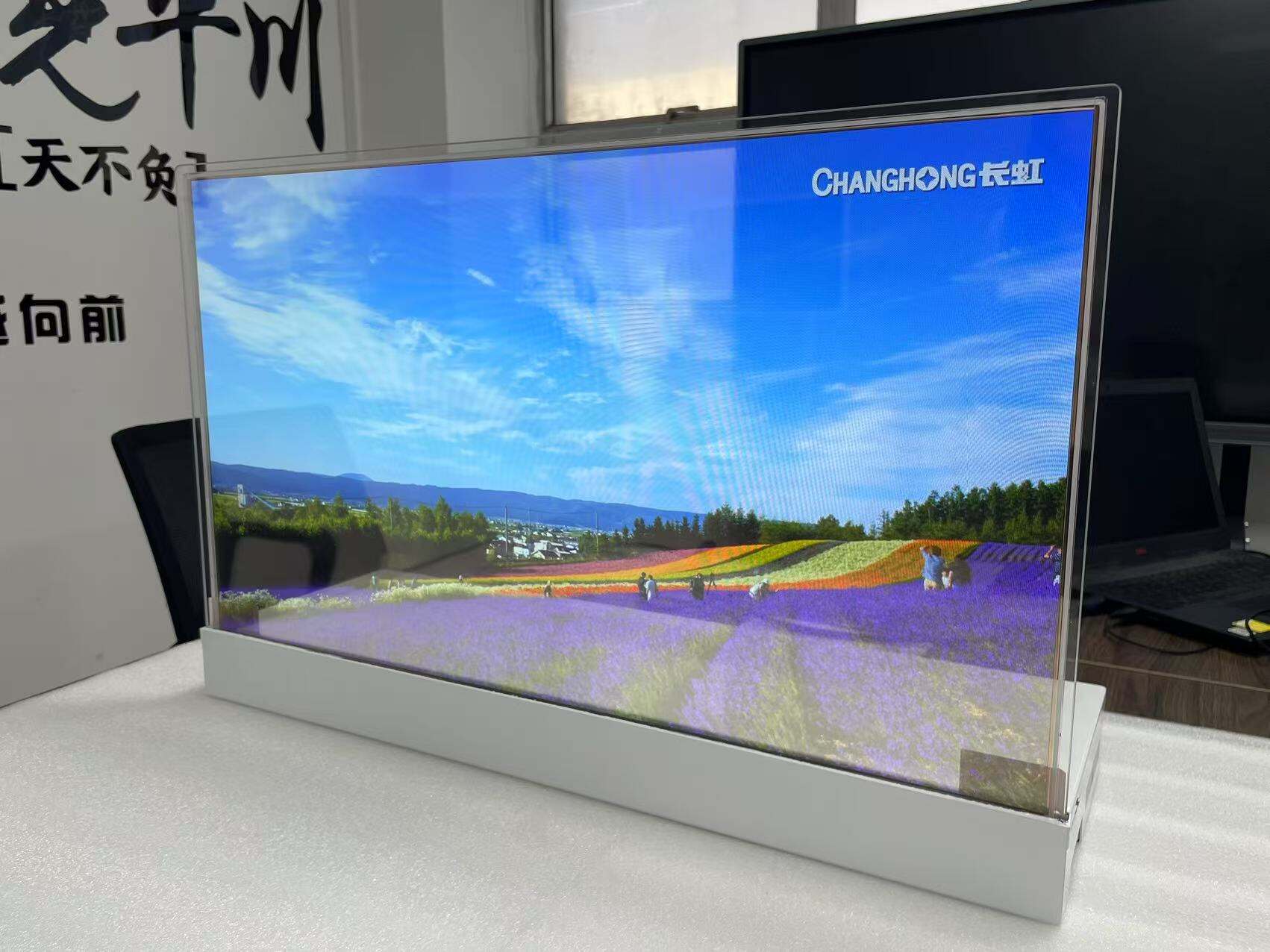
En luksusjuvelbod på Manhattan brukte 45 000 dollar på transparente OLED-skjermer – og så dem svikte innen seks måneder. Årsaken var ikke en defekt. Skjermene var bare feil for miljøet: 45 % transparens som forvandlet vinduene til tonede barriereflater, og 600 nit lysstyrke som ble borte under direkte ettermiddagssol.
Denne feilen oppstår kontinuerlig. Med at markedet for gjennomsiktige skjermer vokser fra 3,03 milliarder dollar i 2025 til 12,76 milliarder dollar i 2030 med en samlet årlig vekstrente (CAGR) på 33,62 %, strømmer leverandører inn på markedet med skjermer som er optimalisert for spesifikasjonsark snarare enn for reelle bruksforhold. Forskjellen mellom en imponerende installasjon og en dyr fiasko avhenger av to spesifikasjoner som de fleste kjøpere overser: kompatibilitet med gjennomsiktighetshastighet og lysstyrkekrav for dine spesifikke belysningsforhold.
Forstå gjennomsiktighetshastighet: Den avgjørende spesifikasjonen
Gjennomsiktighetshastighet er ikke bare en teknisk spesifikasjon – den avgjør om skjermen din forbedrer rommet ditt eller blokkerer de nøye utformede siktlindene dine.
Kommersiell gjennomsiktighet:
- Standard kommersiell: 38–45 % gjennomsiktighet
- Premium kommersiell: 60–70 % gjennomsiktighet
- Ultra-premium: Opp til 90 % gjennomsiktighet
For butikksapplikasjoner er 60 % gjennomsiktighet terskelen for minimumskrav. Under denne terskelen begynner skjermen å fungere mer som en tradisjonell skjerm med en tonet glaseffekt, heller enn som et virkelig gjennomsiktig vindu. Luksusbutikker og museumsinstallasjoner krever vanligvis minst 70 % for å bevare arkitektonisk integritet i rommet.
Krav som varierer etter miljø:
- Butikkfront: Minimum 60–70 % for å bevare attraktiviteten ved vindusbutikking
- Museer og gallerier: 70–85 % for å unngå konkurranse med utstillingsobjekter
- Korporative lobbyer: 50–60 % akseptabelt med riktig innholdskonfigurasjon
- Restauranter og barer: 45–60 % tilstrekkelig med kontrollert omgivelsesbelysning
Gjennomsiktighetsgraden påvirker direkte din innholdsstrategi. Skjermer med lavere gjennomsiktighet (38–45 %) fungerer best med fullrammeinnhold og mørkere bakgrunner. Skjermer med høyere gjennomsiktighet (70 % og over) egner seg best for minimalistiske designløsninger som utnytter den gjennomsiktige effekten.
Lysstyrkespesifikasjoner: Tilpasse skjerm til miljøet
Skjermens lysstyrke må overvinne omgivende lysforhold samtidig som bildekvaliteten opprettholdes. Feil spesifikasjon av lysstyrke gjør innholdet ditt usynlig under tidspunkter med høyest visning.
Standard lysstyrkeområder:
- Indoormiljø med lavt omgivende lys: 400–600 nits er tilstrekkelig
- Typisk butikkbruk: 600–800 nits anbefales
- Miljø med sterkt omgivende lys: 1000+ nits kreves
- Områder nært sollys: 1500+ nits er nødvendig
De fleste transparente OLED-skjermene opererer i lysstyrkeområdet 400–1000 nits, noe som fungerer godt i kontrollerte innendørs miljøer. Butikkskylver med sør- eller vesteksponering, kjøpesenteratrier med takvinduer eller rom nær gulv-til-tak-vinduer krever imidlertid skjermer på den øvre enden av dette området eller tilleggsregulering av belysningen.
Viktig vurdering: Transparente skjermer kan ikke konkurrere med direkte sollys. Den maksimale driftstemperaturen er vanligvis 35 °C omgivelsestemperatur, noe som gjør dem uegnede for utendørsinstallasjoner eller rom uten klimaregulering.
Lysstyrke påvirker også strømforbruket og skjermens levetid. Å kjøre en skjerm konsekvent på maksimal lysstyrke reduserer levetiden. Angi en reservekapasitet for lysstyrke på 20–30 % over de vanlige driftsforholdene.
Størrelsesbegrensninger og planleggingsbegrensninger
I motsetning til tradisjonelle skjermer med dusinvis av størrelsesalternativer, er det begrenset utvalg av standardstørrelser for transparente OLED-skjermer på grunn av produksjonskompleksiteten:
Standard kommersielle størrelser:
- 30 tommer: Inngangsnivå, bruksområder ved kasseapparater
- 49 tommer: Standard for butikker og bedriftsinstallasjoner
- 55 tommer: Premium-butikker, museumsutstillinger
- 77 tommer: Flaggskipbutikker, arkitektoniske installasjoner
Tilpassede størrelser krever OEM-bestillinger med betydelige minimumsantall og forlenget leveringstid. Planlegg installasjonen din rundt standardstørrelser, eller vær forberedt på tilpasset produksjonstid på minst 8–12 uker.
Faktorer som påvirker installasjonsplanlegging:
- Frontrammer legger til 2-3 tommer på totale dimensjoner
- Ventilasjon krever 4-6 tommer fri plass på alle sider
- Vekten varierer fra 35-100 pund avhengig av størrelse
- Monteringssystemer må støtte både skjerm og tilhørende maskinvare
Videovegg-konfigurasjoner øker kompleksiteten. Selv om det er teknisk mulig, krever transparente OLED-videovegger nøyaktig justering, ensartet transparensavstemming og innhold spesielt utformet for flerpanel-layoutr
Krav til innhold og integrering
Transparente skjermer krever andre innholdsstrategier enn tradisjonelle skjermer. Svarte piksler vises som transparente, noe som grunnleggende endrer designtilnærminger
Grunnleggende prinsipper for innholdsoptimalisering:
- Unngå store svarte områder – de skaper synlighetsbrudd
- Bruk klare, mettede farger for maksimal effekt
- Design negativt rom bevisst rundt transparens
- Test innhold i reelle lysforhold før endelig godkjenning
Integrasjonsoverveielser:
- Operativsystemer: Windows, Android eller egendefinerte Linux-utgaver
- Inndataalternativer: HDMI, DisplayPort, USB-C, trådløs overføring
- Kontrollsystemer: RS-232, LAN eller proprietære protokoller
- Innholdsstyring: Cloud-basert CMS, lokale mediaspillere eller integrerte løsninger
Berøringsfunksjon legger til $1 500–$3 000 i skjermkostnader, men muliggjør interaktive opplevelser som rettferdiggjør premieprissetting i butikkmiljøer. Støtte for flerberøring (10+ punkter) er nødvendig for profesjonelle applikasjoner.
Caison Transparente OLED-skjerm-løsninger
Caison tilbyr transparente OLED-skjermer utviklet for kommersiell pålitelighet med transparensgrad opptil 90 % og lysstyrke fra 400 til 1000 nits.
30-tommers transparent skjerm (LW300PXL-HRT1):
- Oppløsning: 1366 × 768
- Oppfriskningsfrekvens: 120 Hz for glatt bevegelse
- Transparens: Opptil 85 %
- Anvendelser: Kasseapparater, små butikkskjerminger, produktutstillinger
49-tommers og 55-tommers kommersiell serie:
- Flere varianter med valgfri berøringsfunksjon
- mulighet for 4K-oppløsning for detaljert bildevisning
- Transparens: 70–90 % avhengig av modell
- Lysstyrke: 400–1000 nits for håndtering av omgivelseslys
- Grensesnitt: HDMI, Android, PC-kompatibilitet
Tekniske sertifiseringer:
- UL-sertifisert for installasjoner i Nord-Amerika
- CE-merket for overholdelse av europeiske krav
- Komponenter for kommersiell bruk med rangering for 50 000+ timer drift
Caison tilbyr OEM- og ODM-tilpasning for volumkjøpere som krever spesifikke gjennomsiktighetsgrader, lysstyrkenivåer eller integrasjonsfunksjoner. Tilpasset produksjon er tilgjengelig med minimumsbestillingsmengder samt teknisk støtte gjennom hele spesifikasjons- og installasjonsfasene.
Miljømessige og driftsmessige overveiegelser
Temperaturstyring avgjør skjermens levetid og ytelseskonsistens.
Spesifikasjoner for driftsmiljø:
- Optimalt: 15–25 °C omgivelsestemperatur
- Maksimalt: 35 °C omgivelsestemperatur
- Fuktighet: 20–80 %, ikke-kondenserende
- Ventilasjon: Tvungen luftkjøling anbefales for innkapslede installasjoner
Gjennomsiktige skjermer genererer 150–300 watt varme, avhengig av størrelse og lysstyrkeinnstillinger. Innkapslede kiosker eller vitriner krever aktive kjølesystemer. Skapstemperaturer over 30 °C akselererer OLED-forringelse og anullerer de fleste garantier.
Levetidsstyring:
- Typisk angitt levetid: 50 000–100 000 timer til 50 % lysstyrke
- Den faktiske levetiden varierer betydelig med lysstyrkeinnstillinger
- Pixelforskyvnings-teknologi er avgjørende for applikasjoner med statisk innhold
- Innholdsrotasjon anbefales hvert 4.–6. time for å forebygge brenninn
OLED-skjermer er sårbare for bildebevarelse ved lengre bruk av statisk innhold. Digital skilting applikasjoner som viser navigasjonskart, produktkataloger eller merkevareelementer krever pixelforskyvningsfunksjoner og strategier for innholdsvariasjon.
Ta den endelige utvalgsbeslutningen
Utvelgelsen av din transparente OLED-skjerm bør følge denne prioriteringsrammen:
Prioritet 1 – Miljøkompatibilitet:
- Mål faktiske omgivelseslys-nivåer på installasjonsstedet
- Bekreft kapasiteten til KJEKK-anlegget for varmeavføring
- Vurder kravene til gjennomsiktighet i forhold til arkitektoniske mål
Prioritet 2 – Innholdskrav:
- Definer hovedinnholdstyper og oppdateringsfrekvens
- Avgjør behovet for interaktive funksjoner
- Planlegg infrastrukturen for innholdshåndtering
Prioritet 3 – Budsjett og totalkostnad:
- Visningsutstyrets kostnader
- Installasjon og monteringssystemer
- Innholdskreering og -administrasjonsprogramvare
- Ongoing vedlikehold og støtte
Budsjett 60–70 % for visningsutstyr, 15–20 % for installasjon og 10–15 % for innholdssystemer og opplæring.
Ofte stilte spørsmål
Hvilken gjennomsiktighetsgrad trenger jeg for en butikkfront?
Butikkfronter krever minst 60 % gjennomsiktighet for å bevare attraksjonen for vindusbutikking. Premiumlokasjoner drar nytte av en gjennomsiktighetsgrad på 70 % eller mer. Lavere gjennomsiktighet (38–45 %) gir en tonet vindueffekt som blokkerer siktelinjer og reduserer fordelen med gjennomsiktige skjermer.
Kan gjennomsiktige OLED-skjermer brukes utendørs?
Gjennomsiktige OLED-skjermer er ikke designet for utendørsbruk. Maksimal driftstemperatur er 35 °C omgivelsestemperatur, og lysstyrken (typisk 400–1000 nits) kan ikke konkurrere med direkte sollys. Vurder kun installasjoner under solskjerming og i klimatiserte omgivelser.
Hvor lenge varer gjennomsiktige OLED-skjermer?
Nominell levetid varierer fra 50 000 til 100 000 timer til 50 % av originallysstyrken, noe som tilsvarer 5–11 år med kontinuerlig drift. Den faktiske levetiden avhenger i stor utstrekning av lysstyrkeinnstillingene og innholdsmønstrene. Drift ved 70 % lysstyrke i stedet for 100 % kan doble den funksjonelle levetiden.
Hvilket innhold fungerer best på transparente skjermer?
Lysstarkt, mettet farger med bevisst bruk av negativt rom fungerer best. Svarte piksler vises som transparente, så unngå store svarte områder som skaper synlighetsgap. Test alt innhold i faktiske belysningsforhold før endelig installasjon, siden transparens-effekter endres betydelig av bakgrunnsbelysningen.
Trenger jeg et spesielt monteringssystem?
Ja, transparente skjermer krever monteringssystemer som tar hensyn til ventilasjonskrav (4–6 tommer avstand), støtter skjermens vekt (35–100 pund) og gir tilgang til tilkoblingsportene. Vanlige TV-monteringsløsninger er utilstrekkelige. Bruk produsentens spesifiserte monteringssystemer eller sertifiserte kommersielle AV-monteringsløsninger.
Konklusjon
Å velge riktig transparent OLED-skjerm krever at gjennomsiktighetsgrad og lysstyrkespesifikasjoner tilpasses ditt spesifikke miljø, ikke bare å velge den største skjermen innenfor budsjettet. En 55-tommers skjerm med 45 % gjennomsiktighet og 600 nits lysstyrke vil svikte i en butikkfront eksponert for sollys, mens en korrekt spesifisert 49-tommers skjerm med 70 % gjennomsiktighet og 1000 nits vil gi år med pålitelig ytelse.
Start med en vurdering av miljøet, definer krav til gjennomsiktighet og lysstyrke, og velg deretter størrelse og funksjoner innenfor disse begrensningene. Denne tilnærmingen forhindrer kostbare spesifikasjonsfeil og sikrer at investeringen din i transparente skjermer gir den immersive visuelle opplevelsen som rettferdiggjør premieprissetting.
For kommersielle løsninger med transparente OLED-skjermer utviklet for pålitelighet, utforsk Caisons utvalg av skjermer med gjennomsiktighetsgrader opptil 90 % og tilpasning for spesifikke forretningsbehov.
Innholdsfortegnelse
- Forstå gjennomsiktighetshastighet: Den avgjørende spesifikasjonen
- Lysstyrkespesifikasjoner: Tilpasse skjerm til miljøet
- Størrelsesbegrensninger og planleggingsbegrensninger
- Krav til innhold og integrering
- Caison Transparente OLED-skjerm-løsninger
- Miljømessige og driftsmessige overveiegelser
- Ta den endelige utvalgsbeslutningen
- Ofte stilte spørsmål
- Konklusjon